
岩松信
洋
|
Debian パッケージのレポジトリを bittorrent ネットワーク上に置き、 それを apt で取得するというものが apt-torrent です。
まだ Debian としては頒布されておらず、 フランス人の方が一人でシコシコやっているようです。 http://sianka.free.fr/ で開発が行われています。
bittorrent とは、 P2P を用いたファイル転送用プロトコルとその通信を行うソフトウェアの事を指します。 特徴としては、 P2P でファイルの一部をお互いに送受信しあうというプロトコルになっているところです。
通常の P2P ソフトウェアではファイルを提供元に集まるようになっているが、 このプロトコルを使うことにより、 ネット ワーク帯域のないピアもファイルの配布に協力できるようになっています。
このプロトコル上で Debian パッケージを頒布し、 apt で取得するようにしたものがapt-torrentです。
先にも書いたように Debian としては頒布されていません。
以下のサイトからダウンロードし、 使用します。 http://sianka.free.fr/download/apt-torrent_0.5.0-1_all.deb
apt のソースとして利用できる apt-line も提供されており、 以下の apt-line を/etc/apt/sources.listに追記して使用可 能 で す 。
パッケージをインストールすると、 自動的に /etc/apt/sources.list に追記されます。
以下が追加された apt-torrent 用の apt-line です。
### BEGIN APT-TORRENT SOURCE LIST
# Do not edit or remove the markers, they are used by the apt-torrent package # Uncomment one of the following: # deb http://127.0.0.1:6968/debian/ unstable main # deb http://127.0.0.1:6968/debian/ testing main ### END APT-TORRENT SOURCE LIST |
自分の環境に合わせて apt-line のコメントを外します。
apt-torrent 用の apt-line だけ有効にし、 apt-get update を実行してみます。
iwamatsu@chimagu:~$ LANG=C sudo apt-get update
Get:1 http://127.0.0.1 unstable Release.gpg [189B] Get:2 http://127.0.0.1 unstable Release [776B] Ign http://127.0.0.1 unstable/main Packages/DiffIndex Get:3 http://127.0.0.1 unstable/main Packages [27.9kB] Fetched 28.9kB in 3s (8118B/s) Reading package lists... Done |
いつも使っている apt-get / aptutide / dselect で torrent ネットワークから Debian Package を取得することが可能 です。
しかし、 実はどのようなパッケージが torrent 上にあるのか分りません。 ドキュメントを読む限り先の URI のサイトで公開 されている apt 用のレポジトリ debhttp://sianka.free.fr/debianunstablemain にあるものが公開されているよう です。
apt のフロントエンドである aptitude を使い、 インストールしたときの例を以下に示します。
# aptitude install frozen-bubble
Reading Package Lists... Done Building Dependency Tree Reading extended state information Initializing package states... Done Reading task descriptions... Done The following NEW packages will be automatically installed: fb-music-high frozen-bubble-data The following packages have been kept back: galeon galeon-common The following NEW packages will be installed: fb-music-high frozen-bubble frozen-bubble-data 0 packages upgraded, 3 newly installed, 0 to remove and 2 not upgraded. Need to get 12.1MB/12.2MB of archives. After unpacking 17.3MB will be used. Do you want to continue? [Y/n/?] Writing extended state information... Done Get:1 http://127.0.0.1 unstable/main fb-music-high 0.1.1 [6950kB] Get:2 http://127.0.0.1 unstable/main frozen-bubble-data 1.0.0-6 [5155kB] Fetched 12.1MB in 24s (488kB/s) Selecting previously deselected package fb-music-high. (Reading database ... 208931 files and directories currently installed.) Unpacking fb-music-high (from .../fb-music-high_0.1.1_all.deb) ... Selecting previously deselected package frozen-bubble-data. Unpacking frozen-bubble-data (from .../frozen-bubble-data_1.0.0-6_all.deb) ... Selecting previously deselected package frozen-bubble. Unpacking frozen-bubble (from .../frozen-bubble_1.0.0-6_i386.deb) ... Setting up fb-music-high (0.1.1) ... Setting up frozen-bubble-data (1.0.0-6) ... Setting up frozen-bubble (1.0.0-6) ... Reading Package Lists... Done Building Dependency Tree Reading extended state information Initializing package states... Done Reading task descriptions... Done |
2007/01/18 現在では正常にパッケージが取得できません。 *11
apt-torrent は torrent ネットワーク用のデーモンと、 パッケージを取得するデーモンの 二種類があります。 プロセスを見ると、 apt-torrent のプロセスがあることがわかりま す*12 。
23404 ? Ssl 0:00 /usr/bin/pike7.6 /usr/bin/apt-torrent
23411 ? S 0:00 /usr/bin/pike7.6 /usr/bin/apt-torrent-httpd 23412 ? S 0:00 /usr/bin/python /usr/bin/btlaunchmany /var/cache/apt-torrent --max_upload_rate -1 --parse_dir_interval 7 23644 pts/0 R+ 0:00 ps ax |
apt-torrnet はファイルを取得するデーモン、 apt-torrent-httpd はデータを管理する httpd server です。 これら 2 つ のデーモンが通信を行い、 bittorrent網から Debian Package を取得します。
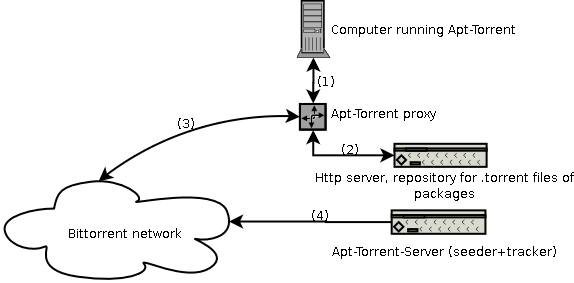
簡単な流れは以下のようになります。
行 う と 、 apt-torrent-proxyを介して、 通信を行います。
通信を行い、 /etc/apt/sources.listに指定してある apt-line のサーバーから情報を取得を試みます。
apt-torrentは seeder*13 と tracker*14 を 行っている apt-torrent にアクセスします。
apt-torrent 用 http server を介して bittorrent 網にアクセスしているので、 http で公開されている apt-line からパッ ケージを取得しているのと変わらない動きをします。
今では、 apt-get 時に http / ftp サーバーに負荷が集中していますが、 apt-torrent を使用することによってひと つのパッケージをピア同士で共有することが可能になります。 apt-torrnet は http / ftp サーバーに負 荷がかからなくなるひとつの方法になるのではないかと個人的に考えています。 変化が激しい unstable / testing は無理としても、 stable のパッケージを apt-torrent で頒布するのはいい方法だと思います。 今後、 開発者と連絡を取り合い、 自宅でも apt-torrent server を立てて、 実験してみようと模索しているところ です。
同じような機能を持った Winny のプロトコルを使い、 apt-winny を実装してみると面白いと思いました。 2ch で winny の Linux 版である Linny を開発しているようなので(コードはまだない。 ) 期待したいと思い ます。
第 24 回東京エリア Debian 勉強会 2007 年 1 月____________________________________________________